
USCIS Online Filing: The 12 MB Upload Limit, Accepted Formats, and Why Files Under the Cap Still Fail
USCIS's online account allows 12 MB per file in PDF, JPG or JPEG, unencrypted. Most rejections are not about the number — they are about photo-heavy evidence bundles, protected PDFs and filenames.
USCIS moved most common benefit forms online, and with them came a file upload step that trips people up for reasons that have very little to do with the published limit. The number itself is generous compared with consular portals — 12 MB per file — but the evidence people upload is the heaviest kind there is: relationship photographs, tax transcripts, multi-year bank statements, and scanned certificates.
This guide covers what USCIS states about uploads, why "We could not upload your file" appears when a file is nowhere near the cap, and how to build evidence bundles that pass on the first attempt.
What USCIS states about uploads
USCIS publishes its upload requirements on its Tips for Filing Forms Online page. As of this writing it says:
- Files must not be larger than 12 MB in size.
- PDF, JPG or JPEG only. For some forms, TIF or TIFF is also accepted.
- Do not encrypt or password-protect your files.
- Use a scanner or photograph each document, and make sure all text is readable.
- Foreign-language documents need the original plus a certified English translation.
- If passport-style photos are required, scan them or photograph them with a phone.
The same rules apply when you respond to a Request for Evidence or add unsolicited evidence from the Documents tab of your account.
The 6 MB number you will still see everywhere
Until fairly recently the limit was 6 MB per file, and a large share of the guidance online — university OPT walkthroughs, the CIS Ombudsman's 2022 I-765 Q&A, forum threads, and several compression-tool pages — still quotes that figure. Some applicants also report that files just under a stated limit were refused until they were reduced further.
The practical rule that survives all of this: build every file to fit under 6 MB anyway. A file that clears the old limit clears the new one, has headroom if the portal measures differently from your file manager, and uploads faster on a slow connection.
Why a small file still fails to upload
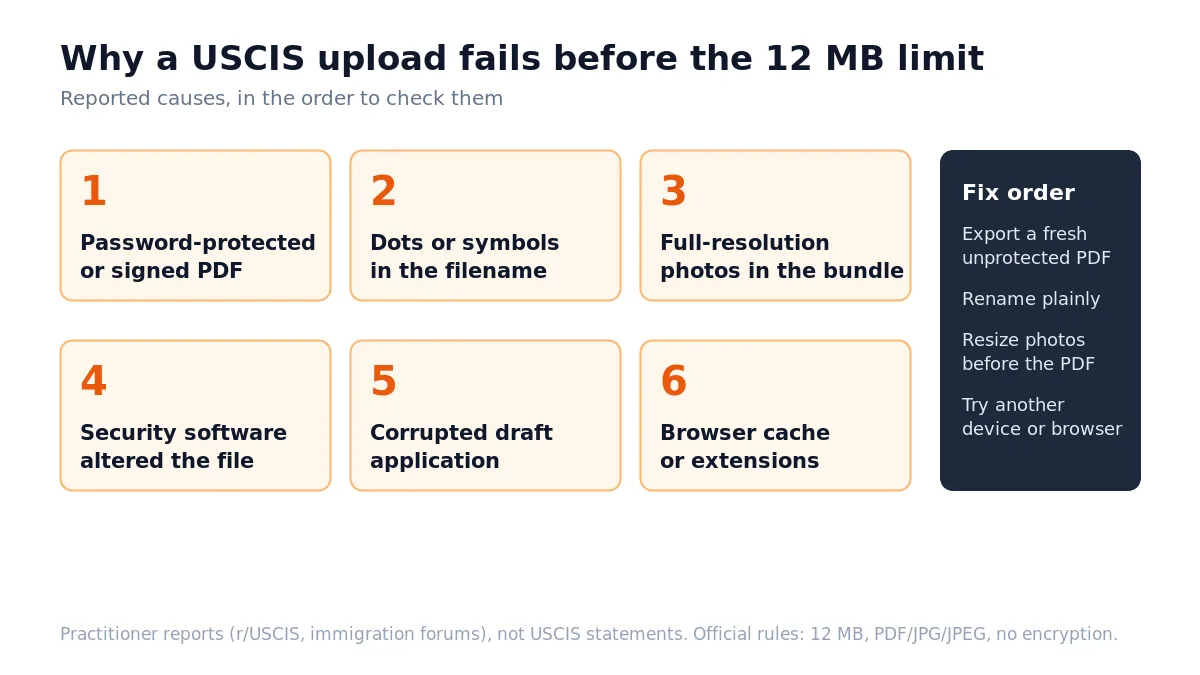
"We could not upload your file. Please try again in a few minutes" is USCIS's catch-all error, and waiting rarely helps. Applicants on r/USCIS and immigration forums consistently report the same underlying causes. These are practitioner reports rather than published USCIS statements, so treat them as a troubleshooting order, not a specification:
- The PDF is protected or signed. Bank and payroll portals often export statements with an owner password or a digital signature. USCIS states it will not accept encrypted files. Export or print a fresh, unprotected copy from the source — do not try to strip a signature from an existing file.
- The filename has dots, symbols or accents.
bank.statement.jan.2026.pdfandEvidencia_Matrimonio_#2.pdfboth trip some uploaders. Usesurname-bank-statement-jan-2026.pdf— letters, digits and hyphens only, one dot before the extension. - The evidence is photographs at full resolution. Four modern phone photos can exceed 12 MB on their own. This is the most common size-related failure and the fix is covered in the next section.
- Security software altered the file. One reported case involved antivirus software silently removing an embedded script from the PDF, after which the upload failed on the desktop but worked from a phone. Uploading the same file from a different device is a fast diagnostic.
- The draft itself is corrupted. For long-running drafts, several applicants report that nothing worked until they deleted the draft and started a fresh one. Do this only before paying.
- Browser state. Switching browsers, clearing the cache, or disabling extensions resolves a surprising share of cases.
Work down the list in that order. Most failures are resolved by steps 1 to 3.
Building evidence bundles that fit
For a browser-local way to prepare a visa evidence copy, use the visa-application compressor after checking the limit and accepted format for your specific USCIS field.
The evidence USCIS asks for on family-based cases — photographs together, joint leases, shared bank statements, correspondence — is exactly the kind of material that produces enormous files. The fix is to control size before the PDF exists, not after.
Photographs
- Resize first. Shrink each photo to roughly 1200 pixels on the long edge at 75–85% JPEG quality. A 4 MB phone photo becomes 200–400 KB with no visible loss at document size. Doing it in this order matters — PDF compression versus image compression shows why shrinking the inputs beats squeezing the finished bundle. Photos straight off an iPhone are HEIC, which USCIS does not accept: convert HEIC to PDF first.
- Caption every photo. Place three or four photos per page in a word processor or Pages/Google Docs, with the date, place and who is pictured under each. Officers repeatedly say an uncaptioned photo dump helps far less than a smaller, annotated set.
- Export to PDF from the document tool. Fifty captioned photos built this way typically land between 5 and 10 MB — split into two files by date range if needed.
Scanned documents
| Setting | Typical size per page | Use for |
|---|---|---|
| 300 DPI, color | 3–8 MB | Photographs only |
| 200 DPI, color | 1.5–3 MB | Documents with color seals or stamps |
| 200 DPI, grayscale | 400 KB – 1 MB | Most text documents |
| 150 DPI, grayscale | 200–500 KB | Text pages with no fine print |
Certificates, transcripts and letters are text with an occasional seal. Scan them at 200 DPI grayscale and a fifty-page bundle fits comfortably. Reserve color for documents where a colored stamp or hologram is part of the evidence. See how to scan a passport or ID to PDF for the identity-document specifics and what DPI to scan at for the trade-off behind this table. When a scan arrives crooked from a sheet feeder or too dark to read a seal, correct it before compressing: straighten the pages and fix the exposure.
Combining and compressing
- Merge the pages for one evidence category into a single ordered PDF with the merge tool. One category per file keeps the officer's job easy and keeps each file small.
- Check the size. If a bundle is over about 6 MB, compress it — and when a field enforces a specific ceiling, work to that number using compressing a PDF to an exact size rather than guessing at presets. Before the bundle goes out, Check PDF reports page count, encryption and structural problems in one pass.
- Compress in the browser. Open the compress tool and drop the file in. These are your tax returns, statements and identity pages — the tool processes them on your device rather than uploading them to a server.
- Start with the moderate setting. Reduce in steps and stop as soon as you are under target. The most aggressive setting is how people end up submitting an illegible I-864 exhibit.
- Open the result and check the hardest page — smallest text, seals, signature lines, account numbers. USCIS's own instruction is that all text must be readable; a small file that fails that test is worse than a large one.
Reduce a USCIS evidence bundle on your own device — statements, transcripts and photo pages stay in this browser tab.
Open Compress PDF →Form PDFs uploaded whole
Some forms can be filed by uploading the completed official PDF instead of filling fields online. The same 12 MB and format rules apply, plus two points from USCIS's PDF-upload instructions:
- The name and date of birth on the PDF must exactly match the online account.
- If you are filing for yourself, the PDF needs an original wet-ink signature at upload time, or you will be prompted to sign digitally from your account.
Do not run a completed official form through a compressor. Flattening can break the form's fields and, for a digitally signed copy, invalidates the signature. Official forms are almost always small already; it is the evidence that needs attention.
Official sources
- Tips for Filing Forms Online — USCIS — the 12 MB limit, accepted formats and the no-encryption rule
- Online Filing Options — USCIS — evidence upload, PDF-upload filing and RFE responses
- CIS Ombudsman I-765 online filing Q&A (2022) — DHS — the earlier 6 MB figure, kept here so you can see where old advice comes from
USCIS revises these pages. If the screen in your account shows a different number, the screen wins.
Before you upload
- Format is PDF, JPG or JPEG (TIF/TIFF only where the form allows it)
- File is under 12 MB — ideally under 6 MB
- No password, no encryption, no digital signature on anything you compressed
- Filename is plain: letters, digits, hyphens, one dot before the extension
- Photos resized to ~1200 px on the long edge before the PDF was built, each captioned
- One evidence category per file, pages in logical order
- Foreign-language originals paired with certified translations
- Every page opened and checked: small text, seals, signatures, account numbers readable
- Original uncompressed scans kept until the case is decided
Frequently asked questions
What is the USCIS file size limit for online filing?
USCIS's Tips for Filing Forms Online page states that evidence files must not be larger than 12 MB each. Older guidance, university OPT guides and many third-party pages still quote 6 MB, which was the earlier limit. Treat the number shown on the upload screen in your own account as authoritative.
What file formats does myUSCIS accept?
PDF, JPG or JPEG. For some forms USCIS also accepts TIF or TIFF. Files must not be encrypted or password-protected. Word documents, HEIC photos and ZIP archives are not accepted.
Why does USCIS say 'We could not upload your file. Please try again in a few minutes' when my file is small?
Applicants report this message for reasons unrelated to size: a password-protected or digitally signed PDF, special characters or dots in the filename, security software altering the file, and browser problems. Reported fixes include renaming the file simply, exporting a fresh unprotected PDF, reducing well below the limit, and trying another browser or device.
How many photos fit in one 12 MB USCIS evidence file?
At full phone resolution, only three to five. Resize photos to roughly 1200 pixels on the long edge before you place them in a document, add a caption with the date and context under each one, then export to PDF. Dozens of captioned photos then fit comfortably in one file.
Can I compress a form PDF I already signed before uploading it to USCIS?
Not if it carries a digital signature — any change to the bytes invalidates it, and BytesPDF refuses signed PDFs for that reason. Compress the supporting evidence instead, or reduce the source document before you sign. A wet-ink signature that was scanned is just an image and can be compressed normally.
Related comparisons
Source-led comparisons written by BytesPDF, with the conflict of interest disclosed on each page. They link official provider documentation rather than fabricated tests.