
India e-Visa: Getting a Passport Scan Under 300 KB Without Making It Unreadable
The Indian e-Visa portal wants your passport page as a colour PDF between 10 KB and 300 KB — the strictest mainstream visa cap there is. A default scan is 10 to 20 times too big.
Most visa portals cap document uploads somewhere between 2 and 12 MB. The Indian e-Visa portal caps the passport page at 300 KB — roughly one-twentieth of what a default phone scan produces. It is the tightest mainstream limit an applicant is likely to meet, and it is paired with a minimum of 10 KB and a colour requirement, so you cannot simply crush the file into a grey smear.
This guide covers what the portal states, why a normal scan is ten to twenty times too big, and a sequence that reliably lands between 150 and 280 KB with the machine-readable zone still sharp.
What the portal states
The official e-Visa site (indianvisaonline.gov.in) publishes the upload specifications directly on the application instructions:
| Upload | Format | Size | Other rules |
|---|---|---|---|
| Digital photograph | JPEG | Minimum 10 KB, maximum 1 MB | Height and width must be equal; full face, front view, eyes open, no spectacles; plain light or white background; no shadows; no borders |
| Scanned passport bio page | Minimum 10 KB, maximum 300 KB | Must show the photograph and personal details | |
| Additional document (business, medical, conference, student and other types) | Minimum 10 KB, maximum 300 KB | Type depends on the visa category |
Three things follow that catch people out:
- The passport must be a PDF, not a JPG. Photo apps default to JPEG; you must convert.
- 300 KB applies to the supporting document too. A hospital letter or invitation on letterhead has to fit in the same budget.
- The regular (paper) visa route has different numbers. Visa agencies note that the regular visa form caps the photograph at 300 KB rather than 1 MB. If you prepared files for one route and switch, re-check.
Why a normal scan is 10–20× too big
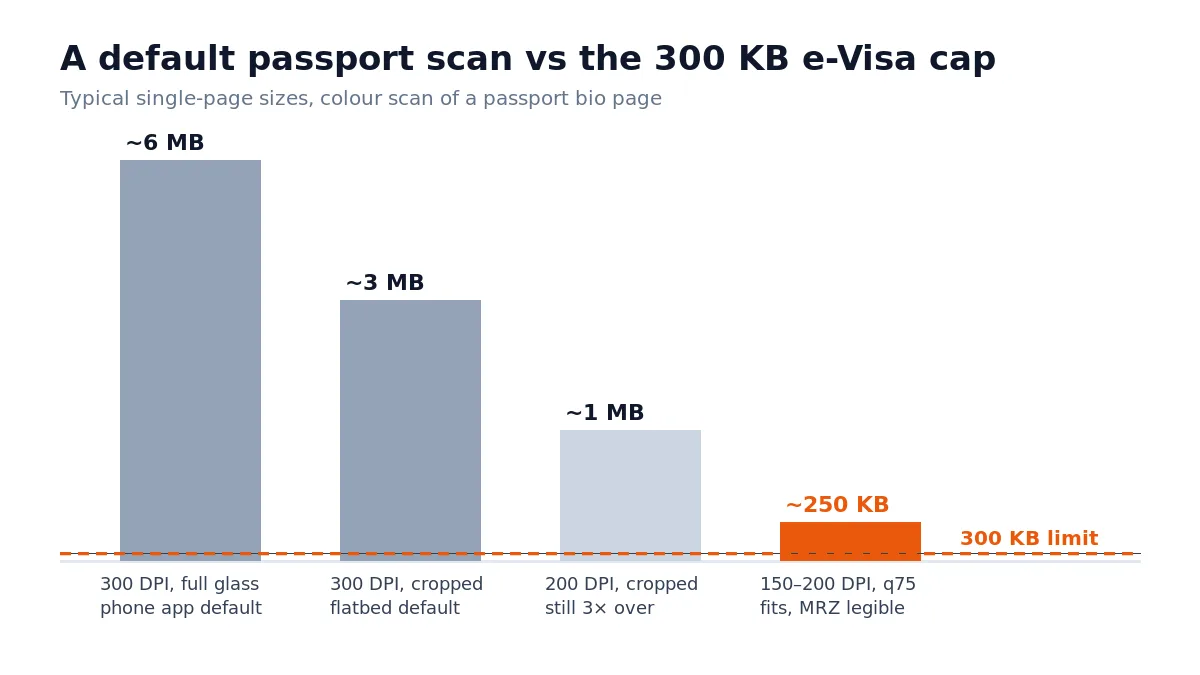
A passport bio page scanned at a flatbed's default 300 DPI in colour is a 2,500 × 3,500 pixel image. Saved with light compression it is 3–8 MB. A phone "scan" app is often worse: 12-megapixel capture, mild JPEG, PDF wrapper, 4–6 MB.
Where the bytes go:
- Resolution. File size scales with the square of the DPI. Halving 300 DPI to 150 DPI removes about three-quarters of the data.
- Page area. A scan of the whole flatbed glass around a passport is mostly white background — cropping to the page alone typically halves the file again.
- JPEG quality. The step from quality 95 to quality 75 is invisible at document size and removes another half.
- Colour. Colour is roughly three times the data of grayscale — but you cannot use this lever here, because the portal expects a colour scan and agencies report black-and-white pages being treated as unclear.
Combine the first three and a 6 MB scan becomes 250 KB with the MRZ, the photo and the passport number all legible.
Getting to 300 KB in order
If the portal accepts PDF for that upload field, the visa-application compressor can prepare a local copy; keep the passport-page format and minimum-size rules in view.
Work top-down. Most passports fit after step 3 and never need step 5.
- Capture only the bio page. Open the passport flat, one page, good light, no glare across the laminate. Include all four corners of the page — agencies report cropped corners as a rejection cause — but nothing else. Scanning a passport or ID card to PDF covers the framing, lighting and crop in detail.
- Scan at 150–200 DPI in colour. This is the single biggest lever, and what DPI to scan at explains why going higher costs bytes without adding readable detail. If your scanner app has no DPI control, choose "medium" or "document" quality rather than "best". If the capture comes out soft or dim, fix it at this step — a blurry scan or one that is too dark only gets worse once it is squeezed to 300 KB.
- Crop tightly. Remove the flatbed background or table around the page.
- Export as PDF with JPEG inside, quality around 70–80%. Check the size. Many scans are already 150–300 KB here.
- If still over 300 KB, compress the PDF. Open the free-to-process compress tool, start with the Recommended setting, and check the size. A 300 KB ceiling is a hard number rather than a quality preference, so BytesPDF Pro target-size compression ($9.99/month; see pricing for checkout status), compressing to an exact size — and, at the tight end, getting a scan under 100 KB — describe how to work down to a cap in steps. Passport pages are among the most sensitive documents you own; the tool processes the file in your browser and does not upload it to a server. Download the result immediately — no account, signup or email.
- Check the result at 200% zoom. The two lines of the machine-readable zone at the bottom, the passport number, the date of birth and the photo must all be crisp. If the MRZ has gone soft, go back one step — a smaller file that fails the clarity check gets rejected all the same.
- Confirm the final size is between 10 KB and 300 KB in your file manager, not the tool's estimate.
Reduce a passport PDF for the e-Visa portal without it leaving your device — start on Recommended and check the MRZ before you upload.
Open Compress PDF →The supporting document has the same budget
Business, medical, conference and several other e-Visa types require an additional PDF — a business card, an invitation, a hospital letter on letterhead — and it has the same 10 KB to 300 KB cap.
These are usually born-digital documents, which changes the approach:
- If you received it as a PDF, it is probably already under 300 KB. Check before doing anything.
- If it arrives as a scan of a letter, treat it exactly like the passport page: 150–200 DPI, crop, moderate JPEG quality.
- If it arrives as a Word or image file, export to PDF from the application rather than printing to an image; text stays as text and the file stays tiny. Photographs taken on a recent iPhone are HEIC rather than JPEG and the portal will not take them directly — converting HEIC to PDF handles that on the device.
- A letterhead with a large colour logo is the usual culprit when a one-page letter is 2 MB. Compression handles that well because the logo is the only image on the page.
The photograph is a separate file with separate rules
Do not upload the passport photo from the bio page as your e-Visa photograph. The photograph is a square JPEG between 10 KB and 1 MB of your face against a plain light background, and the portal checks proportions, framing and background rather than just size.
Most phone cameras produce a 3–5 MB, non-square image. Crop to a square with the head centred and the full head visible, export at moderate JPEG quality, and confirm the result is under 1 MB. This is an image task rather than a PDF task; the tools on this site are for the PDF uploads.
Official sources
- e-Visa instructions — Government of India — the photograph and PDF size specifications quoted above, and the per-visa-type document list
- Bureau of Immigration, India — official immigration guidance
The Government of India charges no emergency or express fee for e-Visas, and the official portal is the .gov.in address above. Third-party sites that reproduce these rules often add their own service fees; the specifications themselves come from the official page.
Before you upload
- Passport bio page is a PDF, in colour, all four corners visible, no glare
- Passport PDF is between 10 KB and 300 KB in your file manager
- MRZ lines, passport number, date of birth and photo checked at 200% zoom
- Supporting document (if your visa type needs one) is also a PDF between 10 KB and 300 KB
- Photograph is a square JPEG between 10 KB and 1 MB, plain light background, no borders
- Nothing password-protected or digitally signed among the files you compressed
- You are on the official
indianvisaonline.gov.inportal
Frequently asked questions
What is the file size limit for the Indian e-Visa passport upload?
The official e-Visa portal states the scanned passport bio page must be a PDF between 10 KB and 300 KB. Supporting documents for business and medical e-Visas have the same 10 KB to 300 KB PDF limit. The photograph is separate: a square JPEG between 10 KB and 1 MB.
Why is there a minimum size of 10 KB?
A PDF under 10 KB almost certainly contains no usable image of the page. The minimum is a crude check that you actually uploaded a scan rather than an empty or broken file. In practice you will only hit it by over-compressing to the point where the page is unreadable anyway.
Can I upload a JPG of my passport to the Indian e-Visa portal?
No. The portal requires the passport page as a PDF. Only the face photograph is uploaded as a JPEG. If your scanner app produced a JPG, convert it to a single-page PDF first, then check the size.
How do I get a passport scan under 300 KB and keep it readable?
Scan or photograph only the bio page in colour at 150 to 200 DPI, crop tightly to the page, then save as JPEG-in-PDF at moderate quality. If the file is still over 300 KB, compress it with a moderate setting and check that the machine-readable zone at the bottom and the passport number are still crisp. Do not use maximum compression on the first attempt.
Should the Indian e-Visa passport scan be colour or black and white?
Colour. The portal asks for a clear scan of the bio page showing the photograph and details, and visa agencies consistently report that black-and-white scans are treated as unclear. Reach 300 KB by lowering resolution and JPEG quality, not by removing colour.
Related comparisons
Source-led comparisons written by BytesPDF, with the conflict of interest disclosed on each page. They link official provider documentation rather than fabricated tests.