
College Financial Aid Uploads: IDOC 9 MB, AMCAS 5 MB, and the Portals With Tiny Caps
Aid season runs on upload boxes: College Board IDOC at 9 MB per file, AMCAS letters at 5 MB, the AAMC letter portal at 1 MB, plus school portals that publish their own caps. Here is how to fit every one of them without re-scanning.
Every October, two things open on the same day: the FAFSA and the CSS Profile. Within days of filing, families start receiving the emails that actually decide the paperwork — "additional documentation required" — and every one of those emails ends at an upload box with a megabyte cap nobody warned you about.
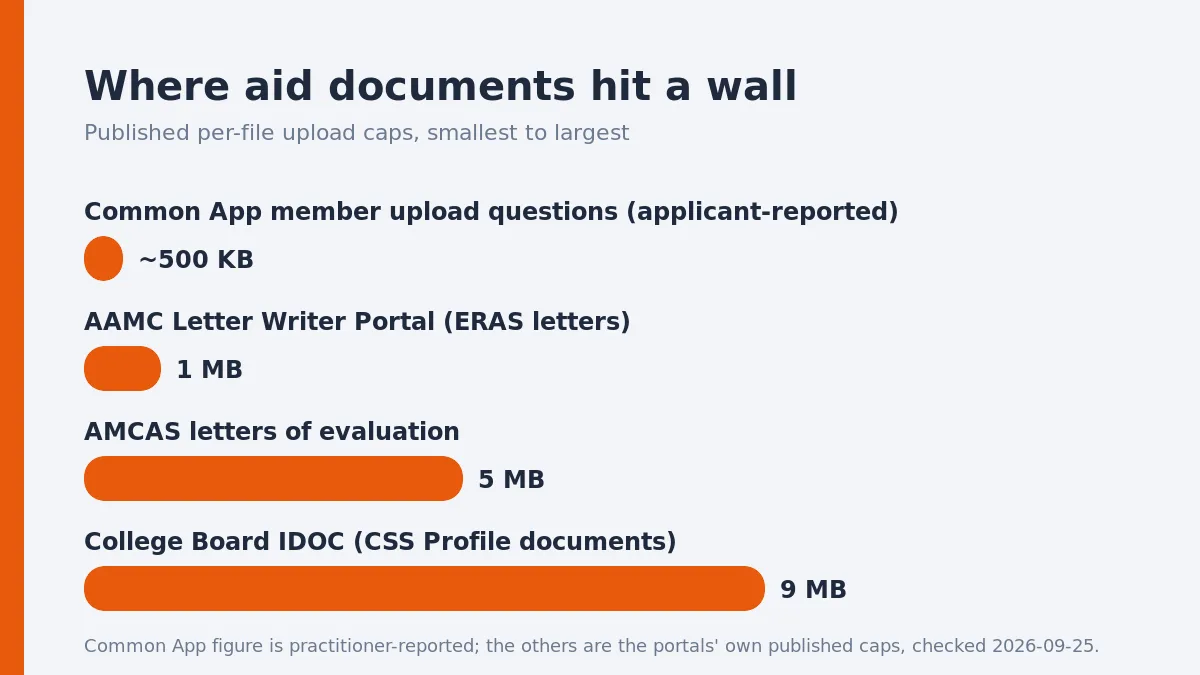
The caps are not one number. They are a ladder: 9 MB at College Board's IDOC, 5 MB for AMCAS letters of evaluation, 1 MB at the AAMC letter portal used in residency applications, and then whatever your own school's financial aid office configured in its portal. This guide maps the published rungs, labels the unpublished ones, and gives you one order of operations that fits all of them.
The published caps
College Board IDOC — 9 MB per file
If any of your colleges require the CSS Profile's Institutional Documentation Service, your IDOC dashboard is where tax returns, W-2s and bank statements go. College Board's own upload page states the rules plainly:
- Files cannot exceed 9 MB.
- PDFs from tax preparation software are preferred; scans and images in PDF, TIF and JPG are accepted.
- No password protection on anything.
- Do not upload the same files more than once — duplicate uploads are a listed processing problem, not a safety net.
- Signed tax returns: signatures must be on the pages before you scan (tax preparer signatures count).
Nine megabytes sounds generous until you photograph a 1040 with a phone. A color photo scan of a two-page return with W-2s attached routinely lands at 10-15 MB — over the cap, with no margin. The same packet scanned at 200-300 DPI in grayscale typically lands between 500 KB and 2 MB.
AMCAS letters of evaluation — 5 MB
Pre-med applicants do not upload their own letters; letter authors do, through the AMCAS Letter Service. AAMC's guidance for letter authors is explicit: password-protected files or documents larger than 5 MB cannot be processed, and the letter must be under 5 MB before upload. One trap for authors and applicants alike: re-uploading a letter to the same Request ID appends the new file to the existing letter instead of replacing it, so a "fixed" scan can double the packet.
AAMC Letter Writer Portal — 1 MB
One stage later, residency applicants' letters of recommendation travel through the same AAMC Letter Writer Portal family, and the cap tightens dramatically: the portal's own help text puts the maximum upload at 1 MB (1,000 KB), and notes that images, color and the Acrobat version — not letter length — are what push a letter past it. If a letter author tells you their upload failed, this is usually why.
FAFSA — no upload box at all
The FAFSA form itself never asks for a document. It is typed data, with tax information transferred electronically. Documents appear only if your school selects you for verification, and then they go through your school's portal or vendor, not through the Department of Education. So the "FAFSA upload limit" you are searching for is really your financial aid office's limit — which is the next rung on the ladder.
The unpublished caps: school portals and member questions
Beyond IDOC, AMCAS and the AAMC portal, every cap is local:
- School financial aid portals. Individual aid offices publish their own figures in bulletins and FAQ pages, and they differ widely — office pages have carried caps as low as 2 MB for secure uploads while neighboring schools accept far more. Your school's aid-office page and the error message on its upload screen are the only authoritative numbers for your packet.
- Common App member upload questions. The Common App application itself is typed data plus recommender and counselor uploads; member schools bolt on their own upload questions (resumes, supplements, financial documents). Applicants have reported for years that some member upload questions reject PDFs above roughly 500 KB. Treat that figure as practitioner reporting, not policy: the cap belongs to the member school, it can change per question, and the message your portal shows is the one that matters.
The practical rule across all of them: read the cap off the screen you are uploading to, then build the file 10-15 percent under it. Portals that accept a file at exactly the cap today may enforce a stricter parser limit tomorrow, and silent failures — upload completes, document never appears — are how aid deadlines get missed.
Why aid documents are the biggest scans you own
Tax packets fail upload caps more often than any other household document, for three reasons:
- They are photographed, not scanned. Phone photos embed 3000-pixel-wide color JPEGs. A text document does not need color or that resolution; 200-300 DPI grayscale keeps every digit legible and cuts the bytes by an order of magnitude.
- They are multi-generation copies. A W-2 faxed, printed, photographed and re-printed accumulates noise, and noise is exactly what compressors cannot shrink. Re-scan from the cleanest paper you have, once.
- They get merged wrong. Ten separate one-page uploads invite the "do not upload more than once" problem at IDOC and the one-file-per-field problem elsewhere; one merged, ordered PDF per requested document type is what processing offices actually want.
One order of operations that fits every cap
- Read the request email and the portal screen: which document types, which cap, which formats (PDF almost always; IDOC also takes TIF/JPG).
- Gather the cleanest paper or original digital PDFs. Prefer the PDF your tax software exports — IDOC names it as preferred, and it is already tiny.
- Scan paper at 200-300 DPI, grayscale for text pages; keep color only where a form or signature genuinely needs it.
- Merge each requested document type into one ordered PDF (return pages 1 and 2 plus schedules, then W-2s), pages upright and in order.
- Compress to sit 10-15 percent under the cap. Compression happens in your browser on BytesPDF — nothing leaves your machine, which matters for tax documents more than for anything else you upload.
- Verify: page count matches the paper, signatures and every digit read at 100 percent zoom, no password or encryption on the file (IDOC refuses protected files, and recompressing a cryptographically signed PDF invalidates that signature anyway).
- Name it plainly — letters, digits, hyphens, one dot — and upload once, then refresh and confirm the document shows as received before you close the tab.
If a portal still rejects a file that is under its cap, the cause is usually not size: password protection, an exotic filename, or a scanner that wrote a corrupted PDF. Export a fresh PDF from the source and retry before you assume the number on the screen is wrong.
Official sources
- Upload Documents — College Board IDOC — the 9 MB per-file cap, accepted formats, no password protection, single-upload rule
- What is the process for uploading documents? — CSS Profile Help Center — "documents must be no larger than 9 MB"
- AMCAS Letter Service for Advisors and Other Letter Authors — AAMC — the 5 MB processing cap and the append-on-reupload behavior
- ERAS: For Letter of Recommendation Writers — ECFMG/AAMC — the AAMC Letter Writer Portal's 1 MB maximum upload
School-portal and Common App member-question figures in this post are labelled in the text as office-published or practitioner-reported; where a number and your portal disagree, your portal wins.
Frequently asked questions
What is the IDOC file size limit?
College Board's IDOC upload states that files cannot exceed 9 MB, and the CSS Profile help center repeats that documents must be no larger than 9 MB. Accepted formats are PDF, TIF and JPG; password-protected files are refused.
Does the FAFSA itself have a document upload?
No. The FAFSA form collects typed data only. If your school selects you for verification, the documents go through your school's own upload portal or vendor — which is why the size cap you actually meet is the school's, not the Department of Education's.
What is the AMCAS upload limit for letters?
The AMCAS Letter Service states that password-protected files or documents larger than 5 MB cannot be processed. Letter authors upload through the AAMC Letter Writer Portal or Interfolio; re-uploading a letter to the same Request ID appends it rather than replacing it.
Why was my 10 MB scan rejected by IDOC but my 8 MB one accepted?
Because 9 MB is a hard per-file cap, not a guideline. A color photo scan of a tax return easily lands at 10-15 MB; the same pages scanned at 200-300 DPI in grayscale typically land under 2 MB. Leave a 10-15 percent margin under whatever cap your portal shows.
Can I compress a signed financial aid form?
Not a cryptographically signed one — recompressing invalidates that signature, and IDOC refuses password-protected files anyway. Sign after compressing if a signature is required, and never encrypt aid documents.
Do Common App uploads have a size limit?
The Common App application itself is typed data with recommender and counselor uploads; member schools add their own upload questions with their own caps. Applicants have long reported member upload questions rejecting PDFs above roughly 500 KB, but only your school's portal message is authoritative — read the error, then fit the file to it.
Related comparisons
Source-led comparisons written by BytesPDF, with the conflict of interest disclosed on each page. They link official provider documentation rather than fabricated tests.